
Hexel1.02 - App Store
You'll be able to see results in few seconds.
Publisher Description
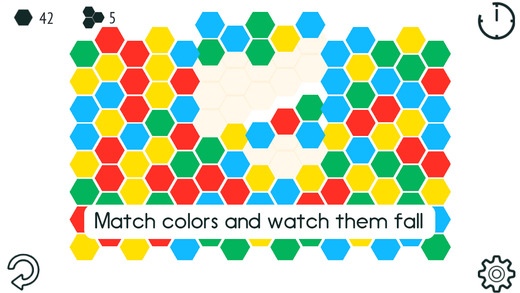
Hexel is a new twist on an the classic match-3 game type. Combine three or more hexes together to make a match, or form six to make a ring. It sounds simple, but when the clock is ticking and you're searching hard to make a match, you'll be saying otherwise.
Features:
- Very easy to learn, but can be challenging to even the most experienced players
- Simple and intuitive touch controls - Just tap and drag!
- Addictive gameplay
- A perfect game for kids and adults, casual and experienced gamers alike
- Progressive difficulty makes it important to think your decisions through
Game Modes:
INFINITY: Play continuously until the two minute clock runs out
STACKED: Sixty seconds to meet the combination target for each level.
RELAXED: Play at your leisure, no pressure of time, letting you think all of your plays through.
- Time is increased by making combinations. Make bigger combinations and survive longer!
- Earn Gold Hexes by making bigger combos and surviving longer
- Use your Gold Hexes to purchase valuable power ups that can save you in a tight spot.
Hexel is 100% free of third party advertisements.
Requires iOS 4.0 or later. Compatible with iPhone 3GS, iPhone 4, iPhone 4s, iPhone 5, iPhone 5c, iPhone 5s, iPhone 6, iPhone 6 Plus, iPhone 6s, iPhone 6s Plus, iPhone SE, iPhone 7, iPhone 7 Plus, iPad, iPod touch (3rd generation), iPod touch (4th generation), iPod touch (5th generation), and iPod touch (6th generation).
About Hexel
The company that develops Hexel is Thomas Hansen. The latest version released by its developer is 1.02.
To install Hexel on your iOS device, just click the green Continue To App button above to start the installation process. The app is listed on our website since 2013-11-13 and was downloaded 0 times. We have already checked if the download link is safe, however for your own protection we recommend that you scan the downloaded app with your antivirus. Your antivirus may detect the Hexel as malware if the download link is broken.
How to install Hexel on your iOS device:
- Click on the Continue To App button on our website. This will redirect you to the App Store.
- Once the Hexel is shown in the iTunes listing of your iOS device, you can start its download and installation. Tap on the GET button to the right of the app to start downloading it.
- If you are not logged-in the iOS appstore app, you'll be prompted for your your Apple ID and/or password.
- After Hexel is downloaded, you'll see an INSTALL button to the right. Tap on it to start the actual installation of the iOS app.
- Once installation is finished you can tap on the OPEN button to start it. Its icon will also be added to your device home screen.
Program Details
System requirements
Download information
Pricing
Version History
version 1.02
posted on 2013-11-13
Disclaimer
Official App Store Link
We do not host Hexel on our servers. We did not scan it for viruses, adware, spyware or other type of malware. This app is hosted by Apple and passed their terms and conditions to be listed there. We recommend caution when installing it.
The App Store link for Hexel is provided to you by apps112.com without any warranties, representations or guarantees of any kind, so access it at your own risk.
If you have questions regarding this particular app contact the publisher directly. For questions about the functionalities of apps112.com contact us.
